SmartResolve AI Developer Tool
Designing an autonomous agent that generates fixes for app crashes. The workflow onboarded 12 new customers and facilitated 20 automated pull requests.
Company
Luciq / Instabug
Role
Product Designer
Timeline
3 weeks · 1 cycle, 2 sprints
Team
PM, Researcher, EM, Developers, Marketing
Overview
SmartResolve accelerates crash resolution by generating AI-powered code fixes. Early versions only provided 3 to 5 static suggestions per crash, often missing context from developers, which may help generate more relevant fixes tailored to their project structure.
The process
From research to handoff.
Empathize
Research
Define
Problem Framing
Ideate
Squad Pre-planning
Test
Product Review
Implement
Iteration & Handoff
- →Conduct interviews and competitive analysis
- →PM Sync, define problems from interview themes and competitor gaps
- →Frame the problem space and clarify scope
- →Technical Alignment, early check with EM to avoid blockers
- →Refinement & Squad Pre-planning, apply feedback and sync with PM and squad
- →Design Chapter Feedback, share with designers for cross-product impact
- →Product Review, present to PMs, EMs, CPO, CTO for feedback
- →Usability Testing, conduct usability testing
- →Refine, handoff to devs, and support implementation
Hover a stage to expand
Empathize
Research
- →Conduct interviews and competitive analysis
- →PM Sync, define problems from interview themes and competitor gaps
Define
Problem Framing
- →Frame the problem space and clarify scope
- →Technical Alignment, early check with EM to avoid blockers
Ideate
Squad Pre-planning
- →Refinement & Squad Pre-planning, apply feedback and sync with PM and squad
- →Design Chapter Feedback, share with designers for cross-product impact
Test
Product Review
- →Product Review, present to PMs, EMs, CPO, CTO for feedback
- →Usability Testing, conduct usability testing
Implement
Iteration & Handoff
- →Refine, handoff to devs, and support implementation
Problem
The problem.
We needed to evolve SmartResolve from static suggestions to an iterative, developer-guided AI workflow.
01
AI-generated fixes lacked accuracy without additional context
02
Competitors like Sentry AutoFix, Firebase Gemini, and Raygun AI set higher expectations for interactive AI tools
User research & themes
Voices from the field.
From 6 Developer Interviews across Staff & Senior Frontend Engineers, Backend Developers, Android Developers, Engineering Managers.
AI Usage
Developers frequently use Cursor, Claude, and ChatGPT for assistance
AI is expected to support autocomplete, refactoring, and logic debugging
Quotes
"I use Cursor daily, it's lightweight with great autocomplete."
Multiple Fix Confusion
Multiple fix suggestions often caused confusion
Subtle or incorrect fixes reduced trust quickly
Quotes
"If the differences are subtle, I won't waste time reviewing."
"One bad experience and I might never use it again."
Contextual Feedback
Developers wanted to guide the AI with the project context
Expectations were shaped by chat-like interactions in other tools
Quotes
"I think three blind guesses don't help."
Competitive landscape
Competitive Benchmark
We benchmarked SmartResolve against the AI crash-fix landscape to find clear improvement opportunities.
Sentry
Line-level feedback with PR integration
Contextual Feedback
Line-level feedback
AI Code Fix
Yes
PR Integration
Yes
Firebase
Context-aware insights without inline fixes
Contextual Feedback
Insights improve with context
AI Code Fix
No
PR Integration
No
Raygun AI
Chat-based fix suggestions
Contextual Feedback
Chat-based suggestions
AI Code Fix
Partial
PR Integration
No
Opportunities
Improvement Opportunities.
/ 01
Provide one initial fix with options to regenerate based on feedback
/ 02
Allow project-specific context input
/ 03
Combine AI-generated fixes, contextual feedback, and pull request automation all in a focused and developer-friendly experience.
Design Iteration: Evolving the Context Input
The first version of the design placed the context input field inside a drawer with the code fix details. But after design team discussions and a product review with PMs, Engineering Managers, CTO, CPO, and Designers, we pivoted to an inline context input:
- 01
Keeps the experience focused
- 02
Prepares for future automation stages where not every action requires context
- 03
Keeps the drawer space flexible for future features like deploying fixes to the store
The inline approach aligned better with the long-term vision of SmartResolve evolving into a fully automated crash-to-store pipeline, minimizing user friction along the way.
Final solution
The Final Solution
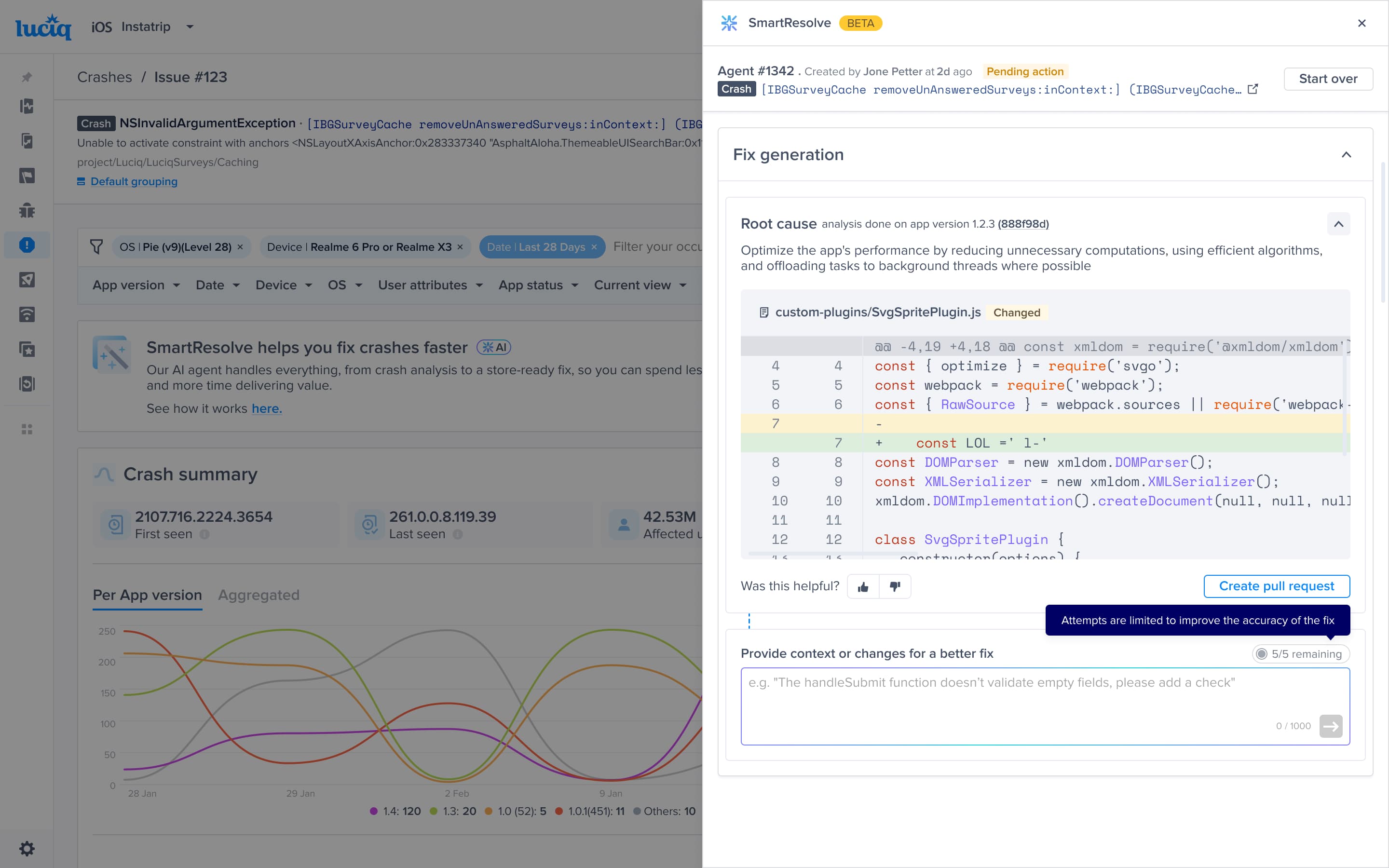
Following feedback from the product review, developers can:
- 01
Provide crash context, assumptions, or project details
- 02
Regenerate tailored fixes based on feedback
- 03
Iterate up to 5 times per crash
- 04
Use example prompts to guide effective input
- 05
Use "thumbs up/down" as a quick feedback per fix
Validation
Usability Testing & Outcome
After rollout, we tested the new experience with internal developers:
- ✓
Feedback input felt intuitive and easy to use
- ✓
Regenerated fixes aligned better with project needs
- ✓
Higher satisfaction compared to static suggestions
Outcome
Positive developer feedback led to a full rollout. However, we received feedback on the agent's reasoning. Thus, in the final iteration, we enhanced the agent experience by adding micro-interactions and reasoning.
Impact
By the numbers.
Within 3 months from rollout
12
New customers onboarded
Within 3 months from rollout
20
Pull requests generated
Using SmartResolve
5×
Max iterations per crash
Up from a single static fix
What's next
Next Steps
- 01
Full rollout to active SmartResolve users
- 02
Monitor success rates, regeneration quality, and adoption
- 03
Gather ongoing developer feedback to plan next iterations
If adoption and numbers are promising, we plan to introduce a wider code preview for better change visibility, as this was a clear developer request during interviews.
Reflection
“This evolution turned SmartResolve into an adaptive AI assistant that blends automation with developer control to improve accuracy, build trust, and streamline the crash fix workflow.”